

Bitcoin (BTC) Price: Oil Tanker Attacks Send Crude Surging, Pushing BTC Below $70,000
TLDR
- Bitcoin fell to $69,393 after attacks on two oil tankers in Iraqi waters sent Brent crude above $100 a barrel.
- Iran announced a shift from “reciprocal hits” to “continuous strikes,” threatening to push oil to $200.
- The Strait of Hormuz remains blocked to ships carrying oil to Israel and the US.
- On-chain data shows apparent demand at -30,800 BTC over 30 days, with the bull-bear indicator still in bear territory.
- The Fed meeting on March 17-18 looms, with oil above $100 making rate cuts less likely.
Bitcoin fell below $70,000 on Thursday after attacks on two oil tankers in Iraqi waters pushed Brent crude back above $100 a barrel.
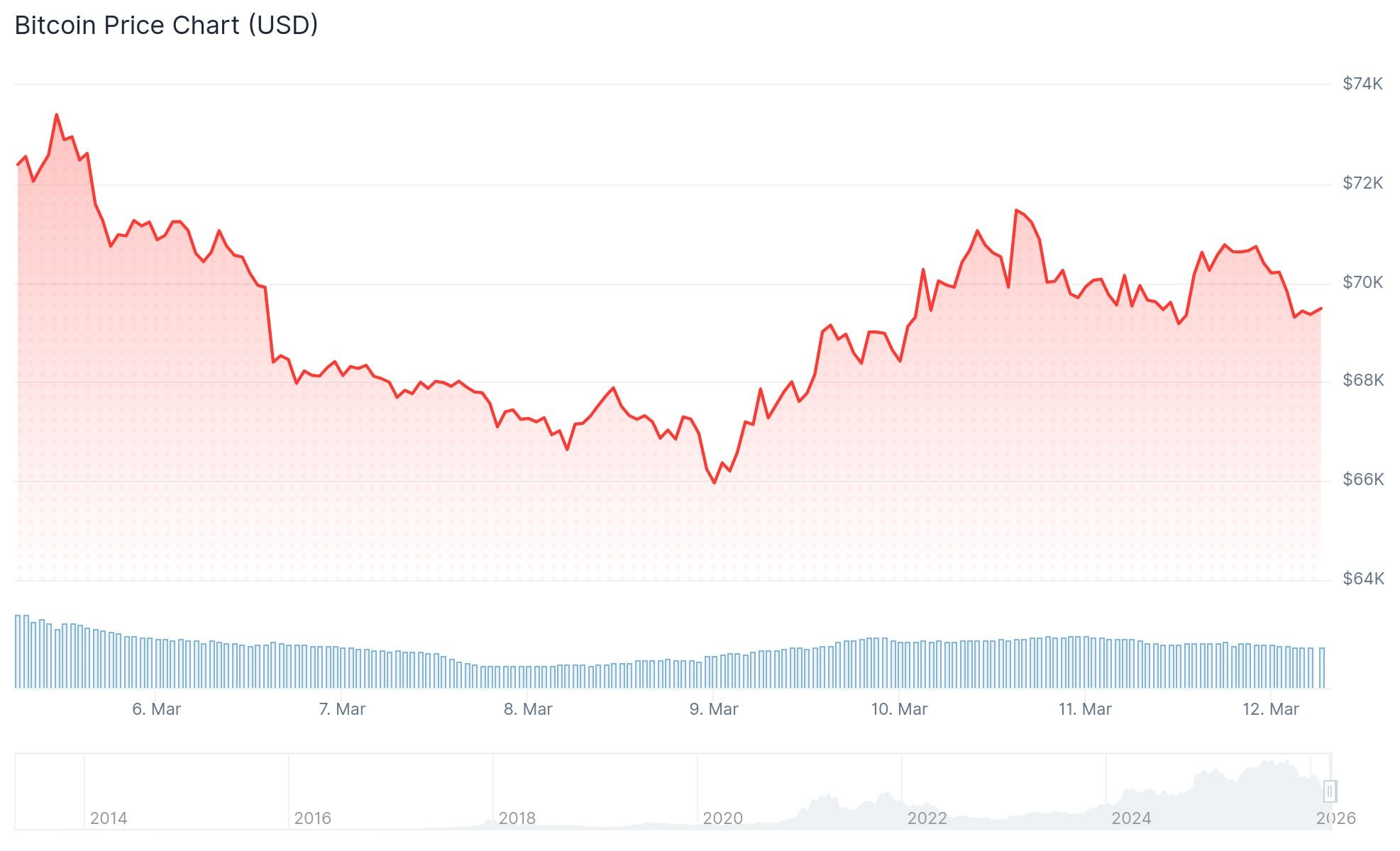 Bitcoin (BTC) Price
The price dropped to $69,393, down 0.8% in 24 hours and 4.3% on the week. It briefly touched $71,230 late Wednesday before the tanker headlines hit, erasing nearly $2,000 in a matter of hours.
This is the third time in two weeks Bitcoin has pushed above $71,000 only to be pulled back by Middle East conflict news.
Brent crude jumped as much as 10.5% on Thursday. The surge was driven by the tanker attacks, continued Persian Gulf hostilities, clearance of Oman’s Mina Al Fahal port, and doubt over whether the IEA reserve release would offset supply disruptions.
The IEA had proposed releasing 400 million barrels from strategic reserves, but markets are not convinced it will be enough.
Iran Shifts War Strategy
Iran’s Islamic Revolutionary Guard Corps announced it would move from “reciprocal hits” to “continuous strikes.” The country also said it would keep blocking ships carrying oil to Israel and the United States through the Strait of Hormuz.
Iran has stated it wants to drive crude oil prices to $200 a barrel.
Reports also indicate the US is running low on interceptors, which could extend the conflict.
Impact on Bitcoin and Crypto Markets
The broader crypto market fell alongside Bitcoin. Ether dropped to $2,025, down 0.5% on the day and 4.5% on the week. Solana fell 1.5% to $85, down 5.7% over seven days.
XRP lost 0.8% to $1.37. Dogecoin fell 0.8% to $0.092, giving back most of Tuesday’s gains tied to Elon Musk. BNB was flat at $642.
MSCI’s Asia Pacific index fell 1.8%, with energy the only sector posting gains.
On-chain data shows apparent BTC demand at -30,800 BTC on a 30-day basis. CryptoQuant’s bull-bear indicator remains in bear territory. Supply in loss continues to rise, and bounces are being sold into.
US inflation came in at 2.4% headline and 2.5% core for February, both above the Fed’s 2% target.
The Federal Reserve meets March 17-18. With oil above $100 and inflation still elevated, rate cuts look increasingly unlikely in the near term.
Bitcoin’s technical picture shows a bearish flag pattern forming on the daily chart, with the coin sitting below its 50-day and 100-day EMAs and the Supertrend indicator still red.
The post Bitcoin (BTC) Price: Oil Tanker Attacks Send Crude Surging, Pushing BTC Below $70,000 appeared first on CoinCentral.
You May Also Like

Tether Backs Ark Labs’ $5.2 Million Bet on Bitcoin’s Stablecoin Revival

MySQL Single Leader Replication with Node.js and Docker
command: --server-id=1 --log-bin=ON The --server-id option gives each MySQL server in your replication setup its own name tag. Each one has to be unique and without it, replication won’t work at all. Another cool option not included here is binlog_format=ROW. This tells MySQL how to keep track of changes before passing them along to the replicas. By default, MySQL already uses row-based replication, but you can explicitly set it to ROW to be sure or switch it to STATEMENT if you’d rather log the actual SQL statements instead of row-by-row changes. \ Run our containers on docker Now, in the terminal, we can run the following command to spin up our database containers: docker-compose up -d \ Setting Up Our Master (Primary) Server To configure our master server, we would have to first access the running instance on docker using the following command docker exec -it mysql-master bash This command opens an interactive Bash shell inside the running Docker container named mysql-master, allowing us to run commands directly inside that container. \ Now that we’re inside the container, we can access the MySQL server and start running commands. type: mysql -uroot -p This will log you into MySQL as the root user. You’ll be prompted to enter the password you set in your docker-compose.yml file. \ Next, we need to create a special user that our replicas will use to connect to the master server and pull data. Inside the MySQL prompt, run the following commands: \ CREATE USER 'repl_user'@'%' IDENTIFIED BY 'replication_pass'; GRANT REPLICATION SLAVE ON . TO 'repl_user'@'%'; FLUSH PRIVILEGES; Here’s what’s happening: CREATE USER makes a new MySQL user called repl_user with the password replication_pass. GRANT REPLICATION SLAVE gives this user permission to act as a replication client. FLUSH PRIVILEGES tells MySQL to reload the user permissions so they take effect immediately. \ Time to Configure the Replica (Secondary) Servers a. First, let’s access the replica containers the same way we did with the master. Run this command in your terminal for each of the replica containers: \ docker exec -it <replica_container_name> bash mysql -uroot -p <replica_container_name> should be replace with the name of the replica container you are trying to setup b. Now it’s time to tell our replica where to get its data from. While inside the replica’s MySQL shell, run the following command to configure replication using the master’s details: CHANGE REPLICATION SOURCE TO SOURCE_HOST='mysql-master', SOURCE_USER='repl_user', SOURCE_PASSWORD='replication_pass', GET_SOURCE_PUBLIC_KEY=1; With the replication settings in place, let’s fire up the replica and get it syncing with the master. Still inside the MySQL shell on the replica, run: START REPLICA; This starts the replication process. To make sure everything is working, check the replica’s status with:
SHOW REPLICA STATUS\G; Look for Replica_IO_Running and Replica_SQL_Running — if both say Yes, congratulations! 🎉 Your replica is now successfully connected to the master and replicating data in real time.
Testing Our Replication Setup from the Node.js App Now that our replication is successfully set up, we can configure our Node.js server to observe the real-time effect of data being replicated from the master server to the replica server whenever we write to it. We start by installing the following dependencies:
npm i express mysql2 sequelize \ Now create a folder called src in the root directory and add the following files inside that folder connection.js, index.js and model.js. Our current directory should look like this We can now set up our connections to our master and replica server in the connection.js file as shown below
const Sequelize = require("sequelize"); const sequelize = new Sequelize({ dialect: "mysql", replication: { write: { host: "127.0.0.1", username: "root", password: "master", database: "replicaDb", }, read: [ { host: "127.0.0.1", username: "root", password: "slave", database: "replicaDb", port: 3307 }, { host: "127.0.0.1", username: "root", password: "slave", database: "replicaDb", port: 3308 }, { host: "127.0.0.1", username: "root", password: "slave", database: "replicaDb", port: 3309 }, ], }, }); async function connectdb() { try { await sequelize.authenticate(); } catch (error) { console.error("❌ unable to connect to the follower database", error); } } connectdb(); module.exports = { sequelize, }; \ We can now create a User table in the model.js file
const {DataTypes} = require("sequelize"); const { sequelize } = require("./connection"); const User = sequelize.define("User", { name: { type: DataTypes.STRING, allowNull: false, }, email: { type: DataTypes.STRING, unique: true, allowNull: false, }, }); module.exports = User \ and finally in our index.js file we can start our server and listen for connections on port 3000. from the code sample below, all inserts or updates will be routed by sequelize to the master server. while all read queries will be routed to the read replicas.
const express = require("express"); const { sequelize } = require("./connection"); const User = require("./model"); const app = express(); app.use(express.json()); async function main() { await sequelize.sync({ alter: true }); app.get("/", (req, res) => { res.status(200).json({ message: "first step to setting server up", }); }); app.post("/user", async (req, res) => { const { email, name } = req.body; let newUser = await User.build({ name, email, }); // This INSERT will go to the write (master) connection newUser = newUser.save({ returning: false }); res.status(201).json({ message: "User successfully created", }); }); app.get("/user", async (req, res) => { // This SELECT query will go to one of the read replicas const users = await User.findAll(); res.status(200).json(users); }); app.listen(3000, () => { console.log("server has connected"); }); } main(); When you make a POST request to the /users endpoint, take a moment to check both the master and replica servers to observe how data is replicated in real time. Right now, we are relying on Sequelize to automatically route requests, which works for development but isn’t robust enough for a production environment. In particular, if the master node goes down, Sequelize cannot automatically redirect requests to a newly elected leader. In the next part of this series, we’ll explore strategies to handle these challenges
